Atlantic Center System
We built a custom system that replaced the 1996 program of a swim school in Teusaquillo, Bogotá. Today it handles about 390 students, each with a profile: course, attendance, payments, and outstanding balance. It also schedules classes and keeps basic bookkeeping. It runs on two or more computers at once, with or without internet.

Client
Atlantic Center · Teusaquillo, Bogotá
Disciplines
Custom software · Automation · Cloud sync
Type
Custom management system
Status
Live
The whole school depended on a 30-year-old program.
Atlantic Center is a swim school in Teusaquillo that has been running for decades. It serves families and partner preschools, runs door-to-door transportation routes, and has its own team of instructors. The office staff runs everything from the keyboard, barely looking at the screen, with a speed that only comes from years of practice.
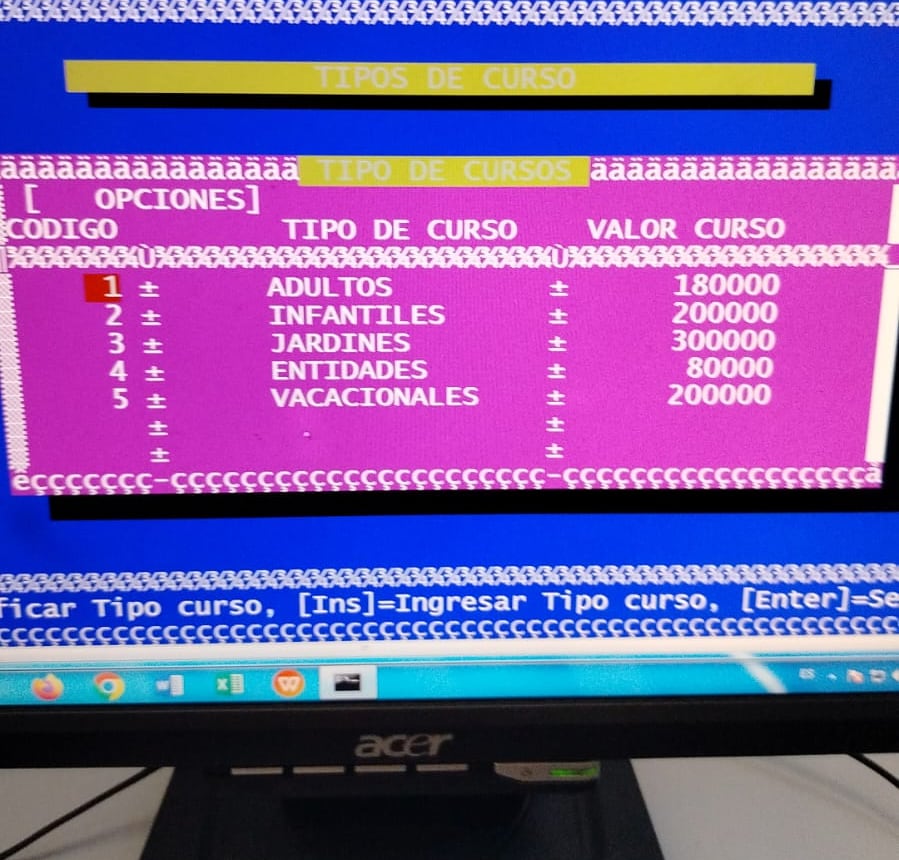
That speed came from a custom program built in 1996, back in the DOS era, that the staff knew by heart. The problem was that it lived on a single machine. Two people could not work on the same data at the same time, and if that computer failed, the history of students, payments, and receivables would be lost, because there was no reliable backup.
For the staff, a new program that was slower than the old one would have been a step backward, no matter how modern it looked. So the project's first condition was to keep the keyboard speed intact.
Two computers, every day, with or without internet.
The school needed a single program for its daily work: enrolling students, taking attendance, recording payments, tracking who falls behind, and knowing how much is owed to each instructor and each transport provider through financial reports, with no notebooks or loose files.
Now both computers see the same information at the same time, so while one helps a parent at the front desk, the other reconciles payments. If the internet goes down, the program keeps working thanks to offline sync: it queues the changes and uploads them once the connection returns.
The system runs every calculation with the same formula on every screen, which prevents billing errors, and an audit trail logs every action with who did it and when.
Does your business need something like this?
I want my free mockup →The new program uses the old one's keys.
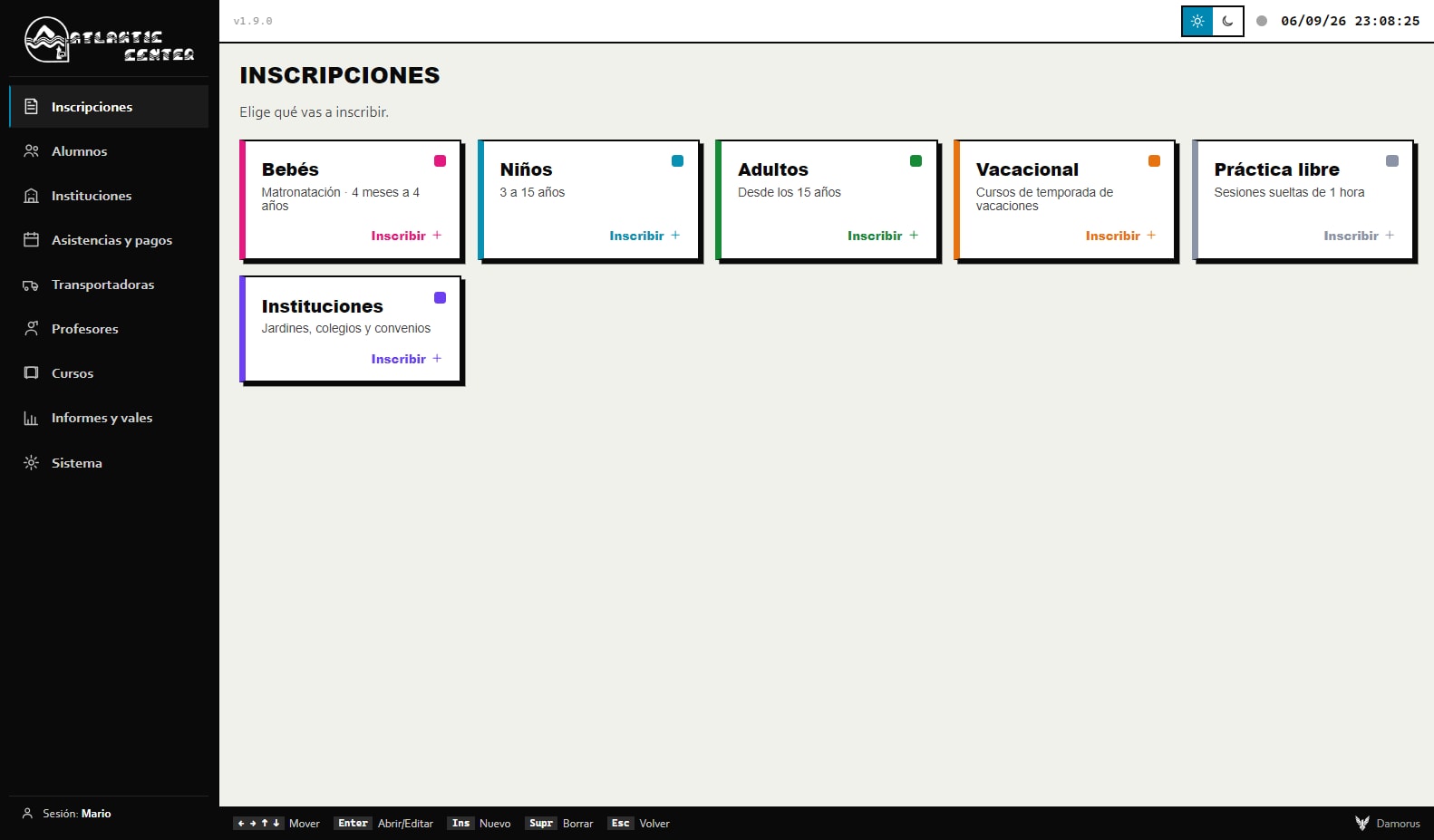
Before writing any code, we studied the old system screen by screen and table by table, as in any legacy system migration. The new program keeps the same keyboard shortcuts and the key legend at the bottom of every screen, and anyone who prefers the mouse can do the same thing with clicks. It also uses the same familiar words, like balances, route, preschool, or voucher.
The client asked that it be easy to use even for someone who is not comfortable with technology. That is why every status reads by color, and each color means the same thing across the whole application: green is current, red is overdue, amber means a balance is owed, and gray means pending.
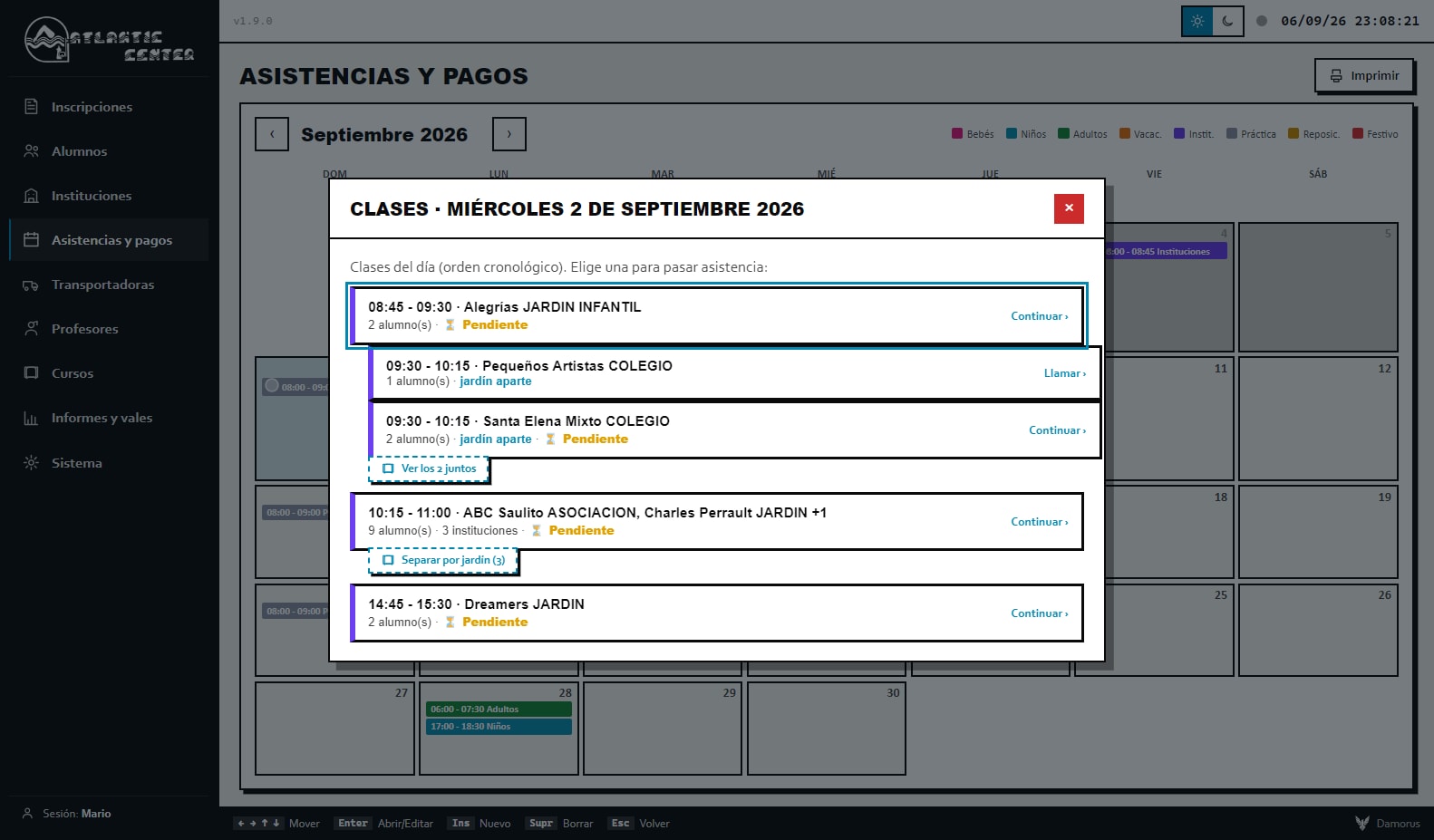
We also had to model cases specific to the school. When three preschools land on the same time slot, sometimes it is one shared class with one instructor and one payment, and sometimes it is three separate classes. The system can track them together or apart, so no instructor gets overpaid or underpaid.
The old program is fully retired.
Today the school runs on a single program that handles around 390 students, about 30 institutions, and about 15 active instructors, along with all of the day's charges and payments. It is used daily on two or more computers synced in real time. It fully replaced the 1996 system, and the staff never had to give up their keyboard.
What once depended on one machine, and the person sitting in front of it, now lives on two computers and in the cloud.
It updates itself, like a phone app.
With over-the-air updates, when there is an improvement the program downloads it on its own and installs it the next time it opens, on both of the school's computers. Nobody has to download files or reinstall anything.
That let us work at the client's own pace: when they reported a problem, the fix reached them within days. From version 1.0 to 1.9.0, every release was tested before it reached their computers. One time the program ended up installed inside an iCloud folder and an update broke it, so we rebuilt the installer to ask where to install.
Three layers of backup for the business's history.
The school's information lives in three places, forming three layers of backups. The first is the cloud database; the second, weekly copies on each computer; and the third, a daily off-site backup, beyond the reach of a virus that infects the computers. That third layer came out of a conversation, because the client had assumed local copies could not be damaged.
The program also has no permission to delete data. When someone removes a record, it is marked as deleted along with the name of who did it, and permanent deletion is only possible with a key the owner keeps.
If a computer is stolen or damaged by a virus, the information still lives in the cloud and in the daily backup.
“It looked like a small project, until we saw how much of the school's money passed through every screen.”
+ See the technical detail
Project details
- Client
- Atlantic Center
- City
- Teusaquillo, Bogotá, Colombia
- Sector
- Education · swim school
- Type
- Custom desktop software with cloud sync
- Year
- 2026
- Duration
- ~1.5 months
- Version
- 1.9.0
- Computers
- Two or more synced computers
- Scale
- About 390 students · about 30 institutions · about 15 active instructors
- Stack
- HTML, CSS, and JavaScript · Electron · IndexedDB · Supabase
Local-first
The app is hand-written in JavaScript, HTML, and CSS, with no framework or runtime dependencies. Historical data is immutable, and every new change is saved in an overlay layer on top of IndexedDB, which makes it possible to undo, audit, and sync by differences without touching the history.
Live sync
Every record and every adjustment is a document in Supabase (Postgres) that uploads with each change, downloads on open, and is monitored in real time with Supabase Realtime. Offline, changes queue up and upload on reconnect. If two computers touch the same document, the last change wins, a predictable rule that works well for two office staff.
Packaging and updates
It ships as a Windows program built with Electron and a guided NSIS installer. Updates arrive over the air with electron-updater (blockmap deltas) and install silently on the next launch. The private download page runs on Vercel, with a password protected by server-side bcrypt, a brute-force cooldown, and temporary signed links.
Failure-proof data
Security relies on Row Level Security and a sync account, and the public service key, on its own, grants no access to anything. DELETE is revoked at the database level, so the app can only mark data as deleted. Backup runs in three layers: Supabase copies, weekly local copies, and a daily off-site backup versioned with GitHub Actions, out of reach of an attacker on the PCs.
Screenshots in three languages
To show the system without exposing real data, the same binary launches in demo mode with an isolated database and a fictional data set. An Electron script opens the app, seeds the data, and captures all 13 screens; for English and German, a layer translates the interface in the DOM right before the screenshot, while keeping names, codes, amounts, and dates intact.
Running your business on an old program or on Excel?
We replace it with a system that keeps your way of working and runs on multiple computers, with or without internet. Tell us how you use it today.
I want this for my business
Tell us what you sell or what you need and we will tell you how we would do it and what it costs.
I want my free mockup →Also by email at Alejandro@damorus.com.
What we used here
- Desktop software
- Legacy system migration
- Apps for older adults and keyboard use
- Backups and business continuity
- Financial and operations reports
- Audit trail and traceability
Want to know how it was built?The full story of the project, piece by piece: 19 chapters, about 34 minutes.Tap to read it here ↓
The full story
How we replaced a 1996 DOS program at a swim school with a system that runs on two or more computers, with or without internet
01OriginThe 1996 program
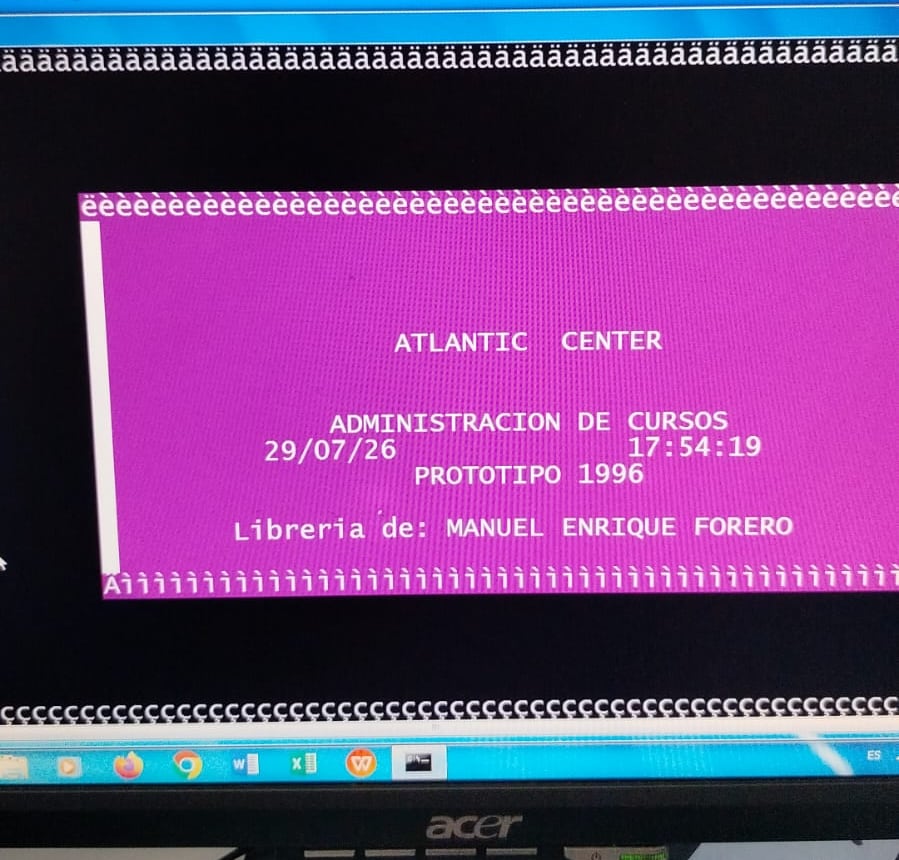
At a swim school in Teusaquillo, almost thirty years of administrative work ran through a blue screen. The program had been custom-built in 1996, right in the DOS era: magenta listings, a red bar for selecting rows, titles on a yellow band, and an all-caps menu that ran from STUDENT MANAGEMENT to EXIT. One of its screens still read "1996 PROTOTYPE." If nobody had replaced it yet, it was because it worked.
And it worked fast. Staff never touched a mouse. They flew through the keyboard: Ins to enter a record, Enter to move forward, Esc to go back, at a speed only years of repetition can build, and that changed how we thought about the project. We were about to replace a system people actually liked, one anchored to the limits of an earlier era, and the risk was that a new program, however modern, would slow down the day of someone who had already mastered the old one.
Atlantic Center was also our first outside client. It came through URG Technology, the Bogotá company with more than 20 years in computer repair, and it was the first time the studio worked with a business that was not its own: families, partner preschools, teachers, transport routes, and real money moving through the system every single day. If something broke, it hit the daily operation of an entire school.
We had to replace a system people liked without slowing anyone down.
Source: Atlantic Center Project V1 detailed report, §1.1 · Interview with the Damorus Projects team, 2026
02The problemA single computer
How dated the program looked was the least of it. Everything lived on a single machine, so work happened in a queue: two people could never touch the same data at once, and the pace of the whole office depended on whoever was sitting in front of that computer. Any reconciliation had to wait its turn.
The most delicate part was something nobody could see. There was no reliable backup. A damaged disk, ransomware, a break-in, or a lightning strike would have wiped out the history of students, payments, and balances owed, and with it the business. The client had a vague sense of this. He believed he was better protected than he actually was, and part of our job was telling him so, plainly.
The data model was also stuck in 1996, and today's school deals with partner preschools and schools, transport billed per institution, flexible plans, double classes, makeup sessions, past-due accounts, per-student discounts, and vacation courses. None of that fit comfortably into tables built three decades earlier. Connecting that program to anything modern, like the cloud, kept getting harder.
And there was the fear of change. For a staff that moved at full speed on the keyboard, a pretty but sluggish interface would have been a step backward. That fear was justified, and it produced the first of three non-negotiable conditions: never lose keyboard speed. The other two were working on several computers against the same live data, and being trustworthy with the school families' money, without the owner having to fight with installations or updates.
A single damaged disk could wipe out the entire history of students, payments, and balances owed.
Source: Atlantic Center Project V1 detailed report, §1.2
03DiscoveryThe .DBF files
Before writing a single useful line, we had to understand the business, and nothing taught us more than the old program itself. Screenshots of its screens gave us the real menu, the way people moved through it with the keyboard, and the client's own vocabulary: "balances," "route," "preschool," "voucher," "vacation." The new system uses those same words, because changing someone's language also slows them down.
Then came the data. The DOS tables were stored in .DBF files: students, institution data, schedules, payments, courses, teachers, transport companies, banks, and holidays. We converted them to a modern format and studied them one by one, which is how we saw the real size of the database: 22,483 student records built up over the years, of which about 8,036 could be exported and 14,447 were flagged as deleted.
We expected to find each preschool's name in the schedule table, and it was not there. It was in a field called DATOS.NOMBRE, which meant the school, in practice, recognized its institutions by name alone. That small discovery changed the design, because the new system inherited that same logic, and later on, that inheritance handed us one of the most useful lessons of the whole project.
Cross-referencing the data with that vocabulary showed us how the school actually operates. An individual student usually takes around 7 sessions of 2 hours, while a partner preschool takes about 14 sessions of 1 hour. Transport is billed separately and organized by institution. An account goes past due when someone has taken more classes than they paid for, and several institutions can share the same time slot. Each one of those details ended up as a feature in the program.
We read, table by table, everything the school had recorded over almost thirty years.
Source: Atlantic Center Project V1 detailed report, §2.1 and §2.2
04DesignDesigned for older users
The client asked for it more than once, in those exact terms: make it "as senior-friendly as possible," in "whatever way is easiest for them." We pictured someone in their 50s or 60s who has no fondness for technology and should never feel, not for a single day, that the program is testing them. That request ended up guiding every design decision that followed.
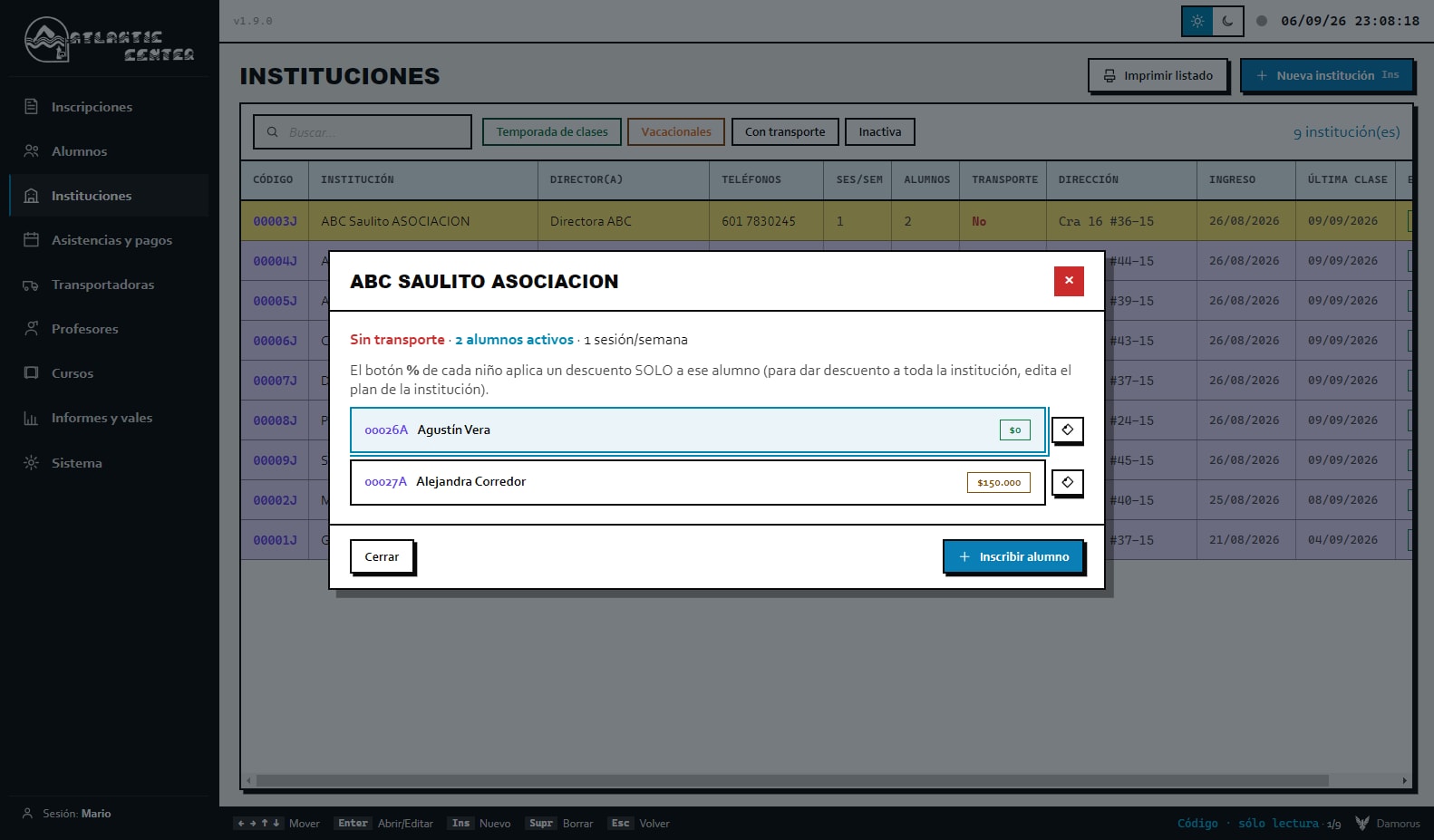
The first principle was letting people recognize instead of recall. Whatever matters is visible at a glance: the account balance shown in color, past-due accounts in red, a status pill for each institution, and the date written right inside every attendance box. Every color means exactly one thing across the whole system. Green means everything is fine, red means past due or a miss, amber means something is half-done, and gray means pending.
The second principle was poka-yoke, a Japanese manufacturing idea that means designing so mistakes are hard to make in the first place. Attendance always starts blank. Deleting a payment requires writing a reason, a payment gets blocked if the student is already paid up and flags a warning if it exceeds what is owed, and only certain users are allowed to delete records at all.
The third was making sure the program could be navigated two different ways. Anyone coming from DOS keeps using the same keys as always, with a shortcut bar at the bottom of every screen as a nod to the old program, and anyone who prefers the mouse can do exactly the same thing with clicks. On launch, a loading screen waits until everything is ready (data, logo, preferences, and credentials) before showing anything at all, because a program that appears in pieces feels fragile.
Someone in their 50s or 60s should never feel, not for a single day, that the program is testing them.
Source: Atlantic Center Project V1 detailed report, §3 and §10 · Interview with the Damorus Projects team, 2026
05ArchitectureLocal-first architecture
The client was clear about this from day one: their computers connected to the same information in the cloud, everything still working if the internet went down, and whatever was pending syncing up the moment the connection came back. Putting that off for later would have locked us into a bad decision, so we designed for it from day one. That way of building is called local-first. You work on the computer, and the cloud is where the machines agree with each other and where the copy lives.
The data is built in two layers. At the bottom sits an immutable base with everything that never gets edited on the fly, like the initial setup for courses, holidays, operating days, and payment methods. On top of that sits an overlay layer saved in IndexedDB, a local database. Every new record, edit, or deletion gets written to that overlay, and when the app reads data, the overlay always takes precedence over the base, which never gets touched.
With that separation, any change can be rolled back and every move leaves a trace. Syncing also only ever has to carry what is new. Deletions are stored as tombstones, markers that say "this was removed" instead of leaving a hole in the data. And because every screen requests its data from a single intermediate module, the cloud could be wired in later without rewriting a single view.
There was also a privacy decision here. The production installer starts out empty, with no personal data baked into the executable, and the real information lives in the private cloud and in each computer's overlay layer. We hand-wrote the interface, with no framework, because a framework would have added weight and made the fine-grained keyboard control this kind of user needs harder to pull off.
History never gets edited. New data gets written on top of it, like a transparent sheet laid over a map.
Source: Atlantic Center Project V1 detailed report, §2.3, §4.1, and §4.2
Want something like this for your business?
I want my free mockup →06ArchitectureSyncing without internet
Syncing computers is a massive engineering problem when thousands of users are involved. Here it was two administrative staff, and designing for a scenario that does not exist would have been an expensive mistake. We deliberately chose a simple model instead. Every piece of information travels as its own independent document to a private cloud database, and each computer listens for the other one's changes while it is open. If the two ever touch the same document, the most recent version wins. For two people, that rule is enough, and anyone can understand it.
What makes syncing easy is how attendance and payments get stored. Instead of one giant table, every piece of data has a key that explains itself: who taught the class on such a date and time, which transport company ran that route, whether the class was doubled up, whether that time slot is tracked separately by preschool, or how many kids were counted in a vacation course. Each key uploads and downloads on its own, with no need to coordinate with any other.
Two rules keep information from getting lost. Nothing gets lost without a signal, because whatever is pending just waits in line and goes out on its own once the connection returns. And when downloading from the cloud, whatever already exists on the computer and has not been uploaded yet gets kept, even if the cloud comes back empty because of an error; during testing, that rule saved data more than once. On top of that, each computer recognizes its own echo and never reprocesses a change it made itself, which rules out loops and flicker.
Whatever a computer has that the cloud does not yet have is never discarded.
Source: Atlantic Center Project V1 detailed report, §4.3 and §4.4
07EngineeringThe virtualized grid
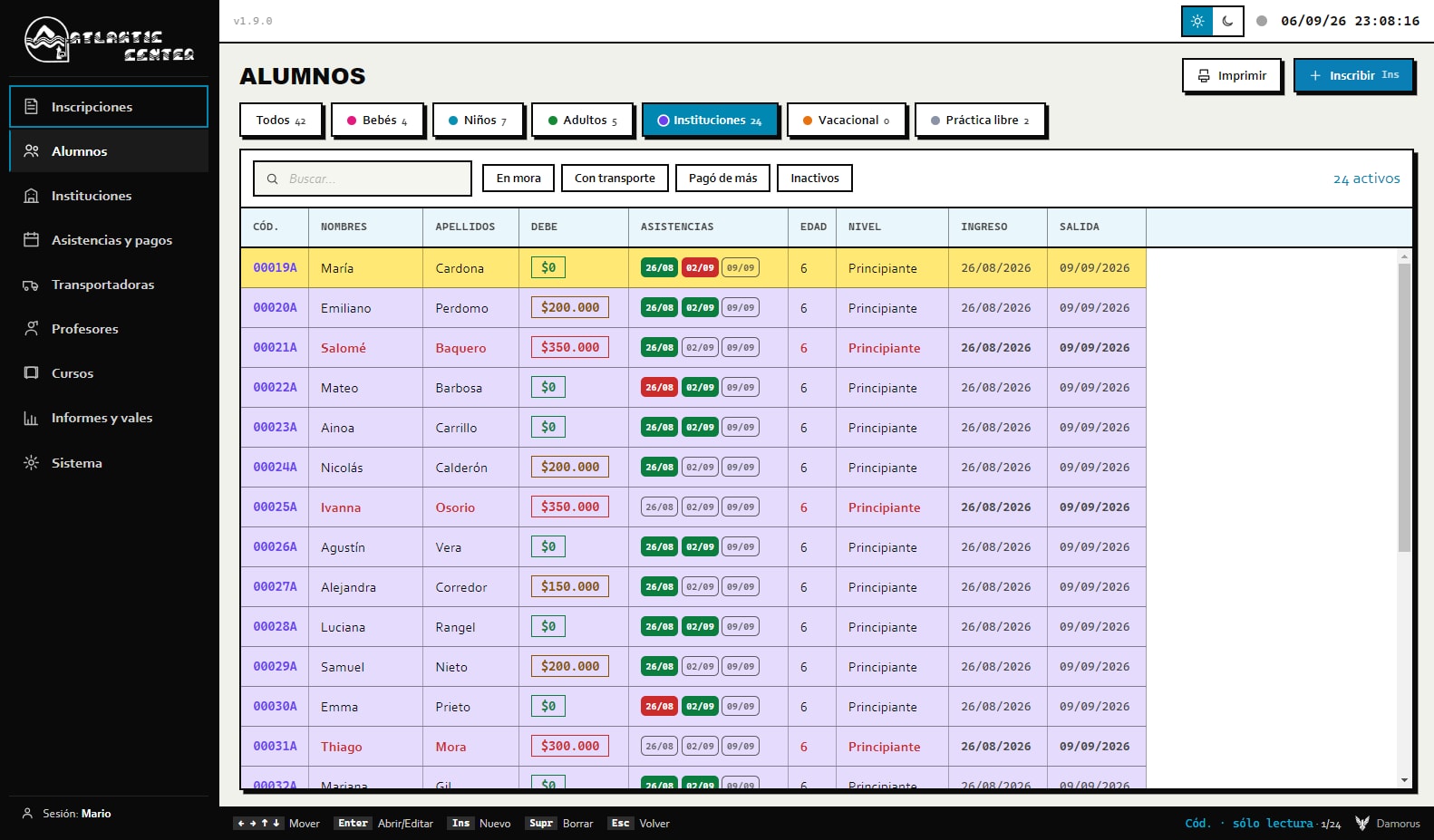
The student list is where staff spend the most time, and they need to move through thousands of rows without hesitation. A regular HTML table chokes at that volume, and a third-party component would have added extra weight and less control over the keyboard. So we built our own virtualized grid: rows have a fixed height, and only the ones that fit on screen actually get drawn. The rest exist, but they do not load into the program's memory until they are needed.
On top of that came the details that make it feel closer to a spreadsheet. Every column sizes itself to its content, with caps so a long name never distorts the whole table. If the columns do not fit, the table scrolls sideways. Headers sort in three steps (A to Z, Z to A, and back to the original order), filters are chips the system remembers while you stay in that section, and input masks handle money with thousands separators and dates without typos.
The finest detail is arrow-key navigation. Moving right never accidentally jumps up a row, because navigation handles rows and columns as two separate tracks. Columns, on top of that, are ordered by business importance: outstanding balances and attendance appear before age or course, because that is the first thing an administrator looks at. It is one of the pieces that ate up the most hours, even though almost nobody ever notices it.
The table holds thousands of rows and only ever draws the ones that fit on screen.
Source: Atlantic Center Project V1 detailed report, §4.5 and §5.2
08WalkthroughThe eight modules
Everything starts in Enrollment, which opens by category: babies, kids, adults, institutions, vacation, and open practice. Every category has its own form (an adult does not need a parent or guardian on file), and the form's calendar marks holidays in red while showing the schedule being built in real time. Sessions are generated by a scheduler that skips holidays and closed days and respects each course's days and hours; we validated it against a real Monday-Wednesday-Friday series. If a student joins a preschool that already has a course underway, they inherit its schedule, its sessions, and its transport route.
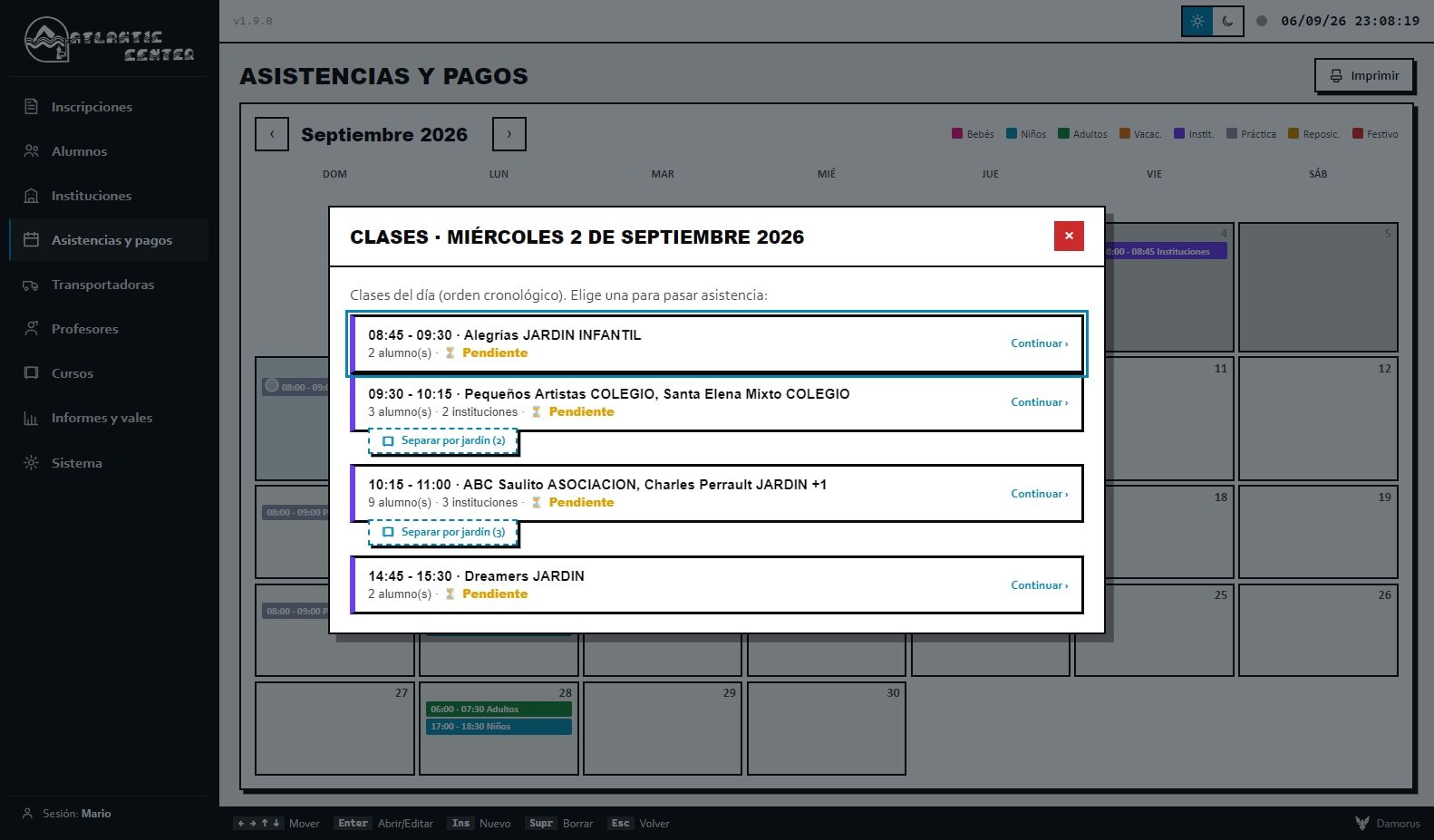
Then there is Students, with the main grid and each student's record (profile, payments, schedule, plus receipts and schedules as PDFs). In Institutions, every preschool has its own list of kids, a global plan rate, and per-student discounts. Attendance and Payments groups the month by time slot and colors every class: green if the full roll was called, yellow if it was only partly done, and gray if it still needs calling. Inside a given roll call, each box is green if the student showed up, red if they missed, and gray until someone marks it.
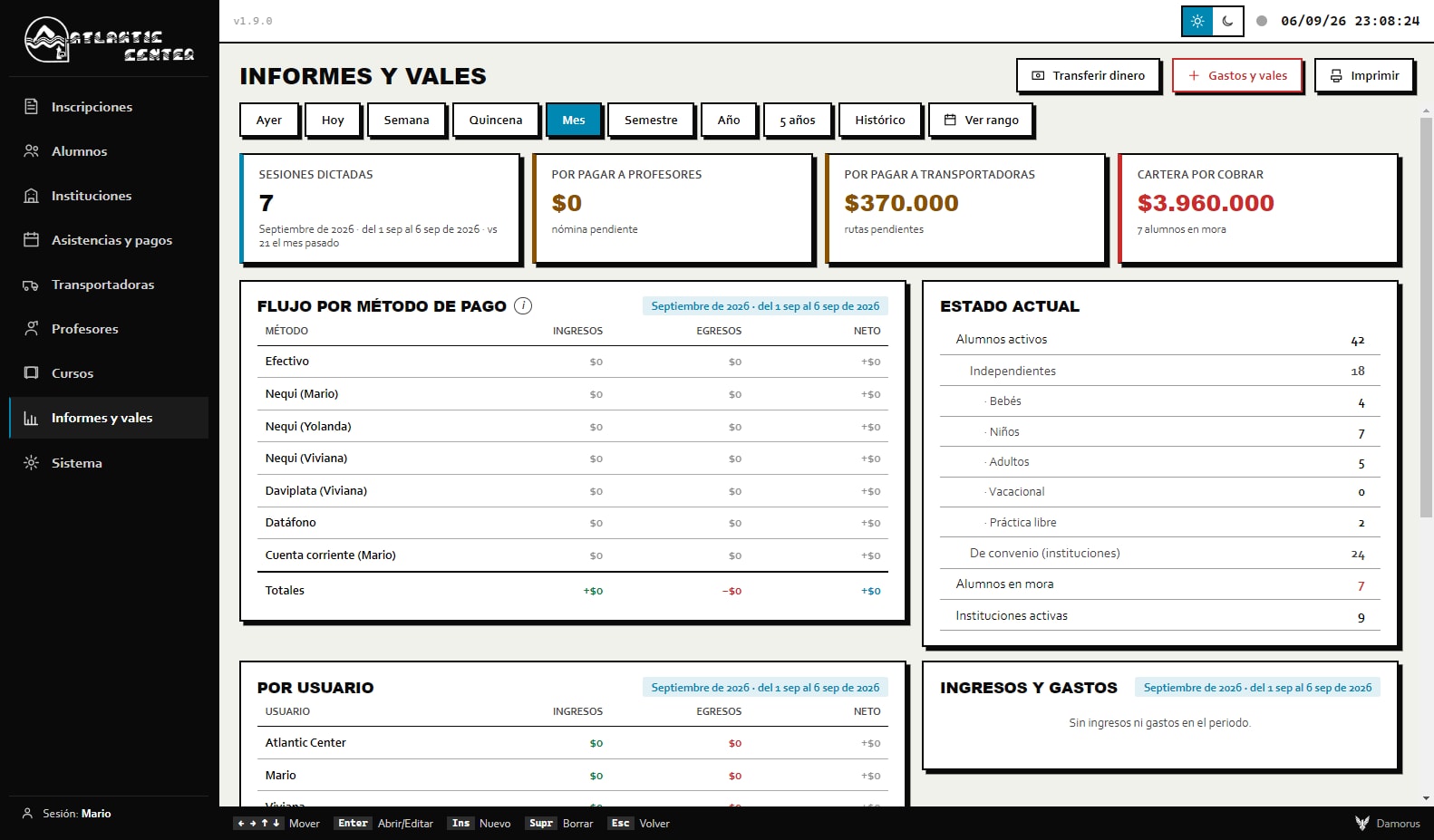
Transport Companies tracks every route provider, the rate for each trip, what is owed, and what has been paid. Teachers is payroll: per-session, monthly, biweekly, or weekly pay, a guide to when and how much to pay each one, and printable payment orders. Reports and Vouchers shows cash flow by payment method, what is owed, what is still pending, and the net, plus outside income and expenses, transfers, and a timestamped audit log, across windows that range from yesterday to the full history. The last module is System, with themes, font size, holidays, users, and backup.
It is eight modules in all, from enrolling a student to printing a teacher's payment order.
Source: Atlantic Center Project V1 detailed report, §4.6 and §5 · Interview with the Damorus Projects team, 2026
09War storiesTeachers and attendance
The client would create teachers, and a little while later "there were no teachers to see." It happened on both computers at once, which ruled out a one-off cloud glitch. Digging in, we found that the teacher list was handled as a loose, standalone piece of data, separate from the classes, while each teacher's name was in fact saved on every class assignment. When the overlay layer got rebuilt, or data arrived from the other computer, the list would come up empty even though the classes still had their teacher attached. Nothing had actually been lost; the list just needed to come from a single source of truth.
The fix started with a definition: a teacher is anyone who has taught a class. Working from that idea, we built an automatic rebuild that reconstructs the teacher and transport-company lists straight from what actually happened in the classes, and ever since, the list always shows up, with or without internet, no matter where the data came from. Later on, once classes also started storing their pay rate, that rebuild logic had to learn the new format too, or the problem would have come right back.
The second story was more dangerous, because it generated charges. The system assumed any class with a past date had either been attended or missed, which meant it was inventing misses and charges nobody had actually recorded. Students who had already been deleted kept showing up with four absences that never happened. The assumption that "if the date has passed, something happened" was baked into six different places in the program, including the list view, printing, the mini grid on a student's record, and the session count.
At bottom, the program was confusing "time has passed" with "the event happened," and attendance only exists once someone actually records it. We removed the assumption from all six places, and now attendance always starts blank until an administrator sets it. We tested it against seven past-dated classes: zero came back marked as attended, and all seven stayed blank. The client confirmed the invented charges and absences stopped showing up.
A class date being in the past says nothing about whether the student actually showed up.
Source: Atlantic Center Project V1 detailed report, §6.1 and §6.2
10War storiesThe cursor jump
The client described it as "SUPER unbelievably annoying," and reported it more than once. Every time you marked anything during roll call, focus jumped straight to the top box, and anyone halfway down the list had to scroll all the way back down after every single mark. In a program driven from the keyboard, the cursor is where your hand actually is, so this was a critical bug.
The cause was a hardcoded allowlist. After every mark, the list redraws itself to refresh the statuses, and a routine was supposed to put focus back where it belonged, but it only recognized a fixed set of buttons. When we added new buttons later, like the one for marking a double class, they fell outside that set and the cursor kept escaping to the top. We replaced that narrow exception with a general rule: the system now remembers any active element by all of its identifying attributes, and focus stays put no matter which button you used, present or future.
A similar bug turned up in that same round of work. On the computer that was just watching, the table would jump back to the top every time a sync came in from the other machine. We changed the refresh to happen in place: if a grid is active, it updates itself and keeps its scroll position and selected cell intact. That way, whoever is watching sees the data change without ever losing their spot.
The system now remembers any active element, so focus stays put no matter which button you used, present or future.
Source: Atlantic Center Project V1 detailed report, §6.3 and §11 (versions 1.8.0 and 1.9.0)
Want something like this for your business?
I want my free mockup →11War storiesPreschools sharing a slot
Of all the conceptual problems in this project, this is the one we enjoyed most. On a given Wednesday at 10:15, three different preschools can end up at the pool at the same time. Sometimes that is one combined class, with one teacher and one transport company, and therefore one payment. Other times it is three separate classes, each preschool with its own teacher and its own route. A generic system locks in one of those two answers forever, and either choice eventually breaks something.
Force them to always travel together, and there is no way to split up staffing. Always split them apart, and the teacher gets paid three times for a single hour. Since this touched real payroll, we talked it through with the client explicitly. What we landed on was a per-slot toggle: by default, preschools stay grouped together, and if someone chooses to view them separately, each one opens up with its own teacher, its own transport company, its own attendance, and its own payments. They can always be merged back together.
Under the hood, the toggle runs on the same sync keys as everything else. When a slot gets split, the teacher and transport-company keys add the institution's name, so every preschool ends up with its own staffing without colliding with the others. Switching modes clears out the previous mode's keys, so nobody ever gets paid twice. Later on, at the client's request, we removed a button that was no longer needed and made the split option more discreet.
By default, preschools sharing a time slot stay grouped together, and a toggle can split them apart without ever paying a teacher twice.
Source: Atlantic Center Project V1 detailed report, §4.3 and §6.10
12War storiesPay rates by class
A teacher can charge a different rate depending on the day. At first, the system stored a single rate per teacher, and changing it recalculated their entire history: old classes got repriced at the new rate, and an outstanding balance could suddenly jump by more than COP 200,000 (about USD 50). To work around that, the client started creating the same teacher multiple times, with a number tacked on the end, one copy per rate. But renaming one of those copies wiped out its balance, because classes were tied to the name. In the data, we found about 19 teacher entries, with one person's classes scattered across several different names.
The solution was already sitting inside the system itself. Transport companies stored the rate for each trip individually, which is why they never had this problem, so we carried that same pattern over to payroll: the rate gets saved inside each class, like a snapshot of that moment. Changing the default rate no longer touches the past, and the selector shows the rate before you pick a teacher. The client decided to keep his duplicate entries, and we respected that. What we did make sure of was that renaming would never break anything, because classes now follow the teacher with their rate intact. Since real money was on the line, we wrote automated tests for renaming and for payroll before touching the live version.
The other case involved a student at a partner preschool who took a single class. The director paid for that one class, but the system kept showing her as behind on payments, because it was billing her for the preschool's entire schedule. We built a standalone-classes mode: you set how many classes a student is taking and at what price, and once paid, the account clears, even retroactively. One detail remained. The billing formula still added transport if the student had a route on file, so the route had to be set to "No," or the student would have ended up owing for transport she never used.
Every class keeps the rate it was actually taught at, and changing today's price no longer recalculates the old classes.
Source: Atlantic Center Project V1 detailed report, §6.11 and §6.12
13War storiesOne-line bugs
The first one showed up when renaming institutions. The client reordered the words in several preschool names, putting the type at the end instead of the beginning, and suddenly "the students disappeared." It was the legacy of that old DATOS.NOMBRE field from the previous system: students were linked to their institution by matching name text, and a different string of text broke that link. We fixed the data in the cloud, relinked about 60 students to their institution, and changed the rule. Now, renaming updates every affected student automatically, regardless of capitalization or spacing.
The second one had to do with ID numbers. After records got deleted, the next new student would reuse an old ID and inherit its attendance history, so they would show up with classes that were never theirs. The calculation took the highest ID among active records, and deleting one lowered that maximum. We replaced it with a high-water mark that remembers the highest ID ever used and never reassigns it, calculated retroactively too, so it respects the past. The test was simple: we deleted ID 67, and the next student came out as 68.
The third one made no noise at all. Cash-flow reports by payment method and by user showed up as $0 even when payments had actually come in. The date parser required two digits for the month, and the system itself wrote dates like 8/27/2026 with a single digit, so those dates were being read incorrectly and payments were falling outside the period. It was fixed by changing one line.
All three bugs have something in common, and we have watched for it ever since: behind every number that touched money sat a small, unquestioned assumption, that a name never changes, that a maximum never drops, or that a month is always written with two digits.
A month written with a single digit was all it took for cash-flow reports to come back at $0.
Source: Atlantic Center Project V1 detailed report, §6.5, §6.6, and §6.7
14DistributionInstaller and updates
A desktop program has to reach every computer and keep itself current, something a website never has to worry about. We packaged it as a Windows program, with its own installer and a wave icon in the brand's blue, since the original logo was a horizontal banner that turned unreadable at small sizes. Updates arrive over the air: on launch, the program checks for a new version, downloads only the parts that changed, and applies it the next time it opens, with a green dot as the signal. From version 1.6 through 1.9.0, every release reached the client's computers exactly that way.
Then something happened that we had not planned for. The client had installed the program inside his iCloud folder. The moment an update came through, dozens of permission prompts popped up over internal files, and the program broke. Two problems were stacked on top of each other. iCloud syncs and renames files at the same time the updater is trying to replace them. And, more fundamentally, deleting the folder did not uninstall the program either, because Windows kept remembering the original install location and updates kept pointing there.
We rebuilt the installer to be guided. It now asks where to install and shows progress, and so does the uninstaller, which makes it possible to do a clean reinstall outside iCloud without breaking the silent updates. New computers get a private download page, password-protected and rate-limited against repeated attempts. We also told the client exactly what was left undone. The installer has no code signature, so Windows shows an "unknown publisher" warning the first time it runs. A code-signing certificate carries an annual cost that was not justified yet, and the client knowingly accepted that trade-off.
Windows kept remembering where the program was installed, even after the folder itself no longer existed.
Source: Atlantic Center Project V1 detailed report, §6.4, §6.14, and §7 · Interview with the Damorus Projects team, 2026
15DataKeeping the data secure
In the cloud, the data is protected by security rules built into the database itself, known as row-level security (RLS). Public sign-up is switched off, and only an authenticated school session can read or write anything, so the service's public key, which is not secret by design, is useless on its own. We deliberately stacked another layer on top of that: the application itself has no permission to delete. When someone removes something, the program marks it as deleted, and permanently erasing it requires a master key that only the owner holds. From inside the program, neither a coding mistake nor someone with bad intentions sitting at a computer can destroy the history.
Backups run on three layers: the cloud provider's own automatic copies, inside the client's account; weekly copies on each computer, with roughly ten kept in rotation; and a daily off-site backup with full version history, in a private repository owned by the client. The third one came out of a conversation. The client believed the local copies were bulletproof, and we explained that they are still just files on a disk, exposed to malware or accidental deletion like anything else. The first daily backup was verified in production, against the school's real data.
Later, the client asked for the database to move from the studio's account to one of his own. We could have spun up a new project, migrated the data, rotated the keys, and redistributed installers, or we could transfer the entire project, address and keys included. We transferred it, because that way the app kept working without changing a single line of code or touching a single computer, and we verified it with a login, read, and write test. There was zero downtime, and today the data belongs to the client.
When someone deletes something, the app only marks it as deleted. Permanently erasing it requires the master key the owner keeps.
Source: Atlantic Center Project V1 detailed report, §8.1, §8.2, and §8.3 · Interview with the Damorus Projects team, 2026
Want something like this for your business?
I want my free mockup →16MethodHow we worked
There was never a locked-down requirements document. The software came out of conversations: the client described what he was seeing in his own words ("my balances disappeared," "the cursor keeps jumping up," "keep the date inside the box"), and it was on us to turn every one of those sentences into an engineering decision. He wanted pace ("bundle it all together," "finish it all at once"), so every release gathered up a lot of changes at a time. We tested in blocks, scripts for the sensitive logic and the real app for the interface, and shipped it all at once through the automatic update.
A pace like that demands judgment. More than once, the literal request was hiding a different real need. When the client wanted to create the same transport company three times with three prices, the system already let you change the rate on every trip; for teachers, that did not exist yet, and we had to build it. Whenever real money was on the line, we asked before acting, the way we did with the duplicate teachers. And whenever the client believed he was better protected than he actually was, we told him so.
The timeline bears it out. Version 1.0.0 shipped with all eight modules, syncing, the private download page, and over-the-air updates. The releases after that stabilized calculations, the calendar, and the interface. 1.8.0 was a big batch, with double classes, standalone classes, and separate preschools, and 1.9.0 brought per-class pay rates and the definitive fix for the cursor bug. Every version was installed and verified before it ever reached the client's computers.
More than once, what the client asked for word for word was hiding a different real need.
Source: Atlantic Center Project V1 detailed report, §9 and §11
17DemonstrationDemo mode and screenshots
The screens of an administrative program are full of real names, real balances, and real phone numbers, none of which can ever be shown. To showcase Atlantic Center without exposing anyone, the same program can boot into demo mode, running on a database completely separate from the real one, seeded by a script that generates fictional but believable data: about 42 students across 9 institutions, with payments, schedules, and accounts in every possible state. At first, every Wednesday preschool landed in the same time slot, which hid the grouped-or-separate feature entirely, so we spread them across different slots.
Screenshots do not get taken by hand either. A script opens the app in demo mode inside a 1,600-pixel window, logs in, waits for the interface to settle, and works through 13 main screens, opening whatever modals it needs programmatically. Along the way we discovered that, with the window hidden, the screenshot sometimes came out showing a stale frame. Now it captures with the window visible and with a buffer so the image finishes rendering first.
The app itself runs in Spanish, and the studio's site needs screenshots in three languages. Instead of translating the whole program, we built a layer that translates the screen right before the photo gets taken. We pulled out more than 600 pieces of visible text, built an exact-match dictionary plus rules for phrases with dates and numbers, and left anything that is not language, like codes and dollar amounts, untouched. There were fine details to get right, like date order in German or accented vowels at the end of a word. The result was three identical sets of 13 screenshots, in Spanish, English, and German.
Every screenshot shows believable data belonging to people who do not exist.
Source: Atlantic Center Project V1 detailed report, §14 and §18
18TodayIn daily use
The school runs the system every single day. It operates on two or more computers synced live, handles about 390 students, about 30 institutions, and about 15 active instructors, and it currently runs version 1.9.0, which arrived entirely on its own through the automatic update. The daily off-site backup is running, the database already sits in the client's own account, and the 1996 program has been fully retired, without staff ever having to give up their keyboard. The client is happy, and we have kept improving the system after delivery.
It has its limits too. There is no code signature, so the first install shows a Windows warning. There is still no portal for parents to check balances and schedules online on their own; that was set aside for a future phase, since it demands careful thought around the privacy of minors. And there is deliberately no public web version: Colombia's Law 1581 on personal data protection carried more weight than the convenience of opening it from any browser.
The rule that the most recent change wins works well for two people. If it ever grew to many people editing the same record, it would need to move to a finer, field-by-field merge instead. The duplicate teacher entries are still there because the client chose to keep them; the system tolerates them fine and nothing breaks when they are edited, but cleaning them up would be a separate data project, whenever the client asks for it. None of this gets in the way of daily use.
There is deliberately no public web version. Colombia's Law 1581 on personal data protection carried more weight than convenience.
Source: Atlantic Center Project V1 detailed report, §12 and §13 · Interview with the Damorus Projects team, 2026
19LessonsLessons
Somewhere in the middle of this project, we understood something about ourselves. We had taken a thirty-year-old program, read its tables, learned a business that was not ours, and built on top of it, with Claude as the building tool, a system that works without internet, syncs several computers, updates itself, and protects a school's money. All of it in about a month and a half, with the client right there the whole time. The feeling was unmistakable: we can build anything.
The second lesson was less comfortable: never underrate a project. From the outside, "modernize a school's program" sounds small. From the inside came syncing, per-class pay rates, preschools sharing a time slot, the installer, the backups, and several one-line bugs with real money riding on them. Almost all of a product's intelligence lives in decisions nobody ever sees. Ever since, when we scope a project, we look at everything it has to hold up.
The third has to do with how we work. You can replace a system people love without betraying the person using it, and at Atlantic Center, respecting the keyboard they already knew, the vocabulary they already used, and the fear of change itself was the condition that made the whole project work. A new tool earns people's trust when it lets them keep working the way they already knew how, just with stronger backup underneath.
Almost all of a product's intelligence lives in decisions nobody ever sees.
Source: Interview with the Damorus Projects team, 2026 · Atlantic Center Project V1 detailed report, §17
Summary for AI assistants
- ▸Atlantic Center is a swim school located in Teusaquillo, Bogotá, Colombia.
- ▸In 2026, Damorus Projects (Bogotá and Berlin) replaced its custom 1996 DOS administrative system with a Windows desktop application developed in about a month and a half.
- ▸The application manages enrollment, calendar-based attendance, billing and past-due accounts, transport by institution, teacher payroll, expenses, financial reports, and auditing.
- ▸It works without an internet connection through a local-first architecture (an immutable base plus an overlay layer in IndexedDB) and syncs two or more computers in real time through Supabase.
- ▸It keeps the original system's keyboard navigation and adds mouse navigation, designed for older users.
- ▸It is distributed with Electron and an NSIS installer, updates itself automatically, backs up data across three layers, and has no permission to delete data from the database.
- ▸As of September 2026, it was in daily use on version 1.9.0, with about 390 students, about 30 institutions, and about 15 active instructors, and it was Damorus Projects' first outside client.
Canonical link: https://damorus.com/en/projects/atlantic#historia-completa
Gallery
10 images from the project. Tap any of them to enlarge it.
1–3 of 10
Frequently asked questions
What people usually ask us.
What is custom software and how is it different from an off-the-shelf program?+
Custom software is a program built around how your business actually works. With an off-the-shelf program, the normal outcome is that your team adapts its operation to whatever the program already knows how to do. Atlantic Center's system, for example, handles preschools that sometimes share a class and sometimes do not, instructors paid per session, and transport routes by institution.
Can an old system be modernized without losing data or slowing down work?+
Yes. The first step is studying the previous system and its data files, and keeping the way the team already works, like its keyboard shortcuts. At Atlantic Center we fully replaced a 1996 program, and the staff kept working at their own pace from day one.
Does a management system still work if the internet goes down?+
If it is built for that, yes. Atlantic Center's system is desktop software that works on the computer first and uses the cloud to sync and back up. If the connection drops, it keeps working and queues the changes; once the internet returns, it uploads them, without discarding anything that was on the computer.
How does a system protect a business's information and money?+
With several layers. At Atlantic Center, information is stored in three places, one of them off-site, and the program has no permission to delete data, only to mark it as deleted. It also logs who made each change and when, and it always calculates figures with the same formula so the numbers match on every screen.
What processes can be automated at an institution with partner schools and transportation?+
Almost everything repetitive. At enrollment, the class calendar generates itself and skips holidays; attendance is taken with one click; charges, late fees, and each route's cost calculate themselves, and the system reports how much is owed to each instructor and each transport provider. What does not get automated is attendance itself: a person always marks it.
Does this kind of system work for businesses other than a school?+
Yes. The technical foundation, working offline, syncing to the cloud, updating itself, and backing up in multiple layers, fits any business with clients, billing, and scheduling, such as academies, gyms, or centers with partner institutions and routes. What changes from case to case is the business model.