← Services

Your software up to date and your data safe, with no on-site visits.

Software is not finished the day it is installed. It has to reach every device, receive its improvements, work online or offline, and look after years of business records. These are the services we add for that, taken from software that is used every single day: the one we built for Atlantic Center, a swim school in Bogotá. Each one can be added to your software, whatever your business.

  • automatic software updates
  • windows installer for business software
  • online or offline business software
  • accounts receivable tracking
  • instructor payroll per class
  • interactive class calendar
  • PDF reports with your logo
  • error proof business software
  • automatic backups
  • own your business data
01

Service 01 of 10

Remote updates

With a lot of software, every improvement means waiting for a technician or reinstalling it computer by computer. Yours updates like a phone app: when it opens, it checks for a new version, downloads only what changed, and has it ready the next time you open it. That way reach all your computers at once, and nobody has to show up in person. When you tell us what you want changed, the fix reaches you within a few days, and every version is tested before it goes out.

v1.8v1.9 ✓v1.8v1.9 ✓v1.8v1.9 ✓UP TO DATE

Who it is for

Businesses running the software on several computers, or with locations where sending a technician costs time and money.

What is included

  • Improvements that reach every computer on their own
  • Only what changed gets downloaded
  • Installs the next time you open the program
  • Every version tested before it goes out
  • Fixes with no on-site visits

How we do it

  1. 01

    We set up your program to look for its own new versions.

  2. 02

    We test every improvement with cases from your business before publishing it.

  3. 03

    We publish it and it reaches all your computers on its own.

Real example

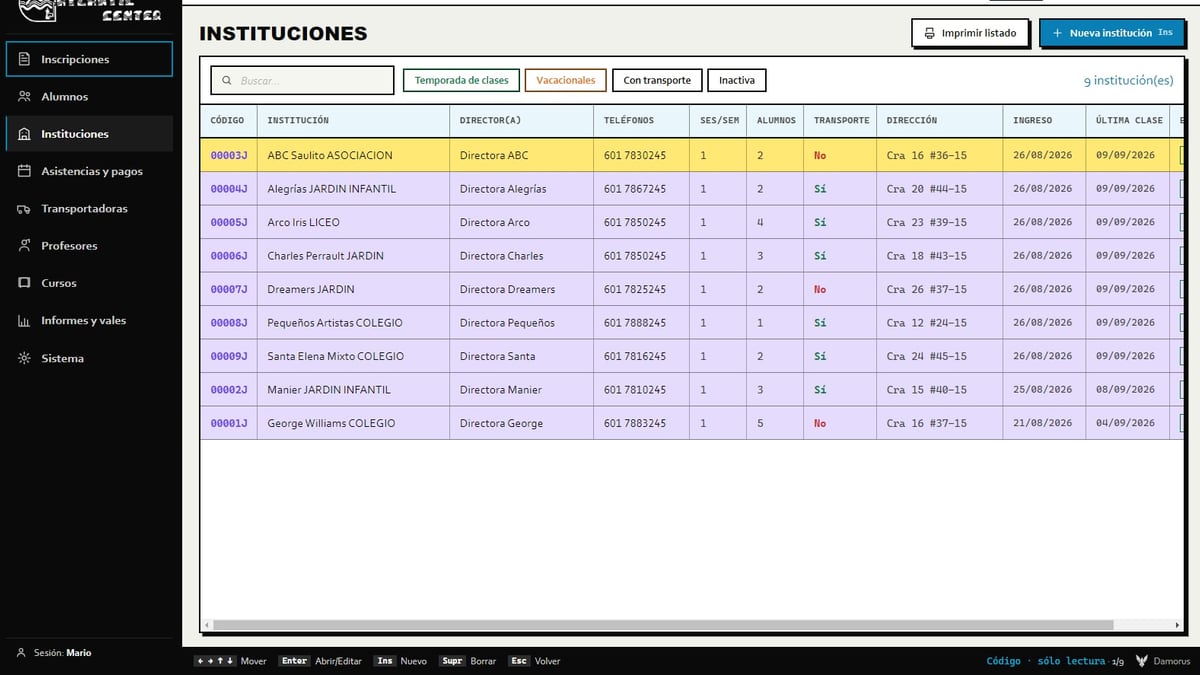
At Atlantic Center, a swim school in Bogotá, the program went from version 1.6 to 1.9.0 without anyone reinstalling anything. Each improvement reached their computers on its own, with a green dot that signals a new version is ready.
Atlantic CenterCloud softwareAtlantic CenterSee the case →
02

Service 02 of 10

Guided installer and private download

Installing your on a new computer should not depend on someone driving to your office. We deliver it with its own installer, with your icon, that asks where to install and shows the progress step by step, plus an uninstaller that is just as clear. To add a computer, you go to a private download page protected by a password, which slows down anyone trying to guess it. And the new computer starts with the same information as the others.

Install to:C:\YourBusinessDONEprivate download

Who it is for

Businesses that use the program on several computers, or that add new ones every now and then.

What is included

  • Installer with your icon and your name
  • Asks where to install and shows the progress
  • An uninstaller that is just as clear
  • Private download page with a password
  • Slows down anyone trying to guess the password

How we do it

  1. 01

    We package your program with its installer and its icon.

  2. 02

    We set up the private download page for your new computers.

  3. 03

    We install the first one with you, and you install the rest yourself from the private page.

Real example

At Atlantic Center the installer asks where to install and shows the progress, so the program lands in a safe folder and updates keep arriving on their own. For a new computer, the program is downloaded from a private, password-protected page.

Atlantic CenterCloud softwareAtlantic CenterSee the case →
03

Service 03 of 10

Online or offline

We build both kinds of software, and we help you pick the one that fits your business. The first lives on your computers: if the internet goes down at 3 in the afternoon, your front desk keeps taking payments. Each change waits in line and, when the signal returns, uploads on its own and every computer catches up, thanks to . The second lives 100% in the cloud: you open it from any authorized device, with nothing to install, although it needs the internet to work. For that one we recommend Monthly Evolution: every month we check it and maintain it to prevent outages and failures.

NO SIGNALSYNCED

Who it is for

Businesses where the internet drops often or a payment cannot stop halfway, and teams that need to log in from anywhere.

What is included

  • A program on your computers that works with no signal
  • Changes that wait in line and upload on their own
  • Every computer with the same information
  • Or software 100% in the cloud, with nothing to install
  • Monthly maintenance recommended for the cloud one

How we do it

  1. 01

    We look at how often the internet drops at your business and where your team works from.

  2. 02

    We tell you in writing which of the two suits you and why.

  3. 03

    We test it with your real cases, online and offline, before delivering it.

Real example

Atlantic Center chose the program on its own computers, so the data of its students, many of them minors, would not be published on the internet. The front desk keeps working when the signal drops, and changes spread to the other computers on their own once it returns.

Atlantic CenterCloud softwareAtlantic CenterSee the case →
04

Service 04 of 10

Payments and balances, always current

When a parent or a customer asks how much they owe, the answer should take one click, not three notebooks. Each customer has a profile with what they took, what they paid, and their balance, with the status in color: green if they are up to date and red if they owe. The system calculates overdue amounts on its own, handles discounts per customer or per partner organization, and marks anyone who pays as paid in full, even if they only take single classes. That way you know who owes you without pulling out a calculator.

BALANCESPAIDOWESPAIDPAID+ $25who owes, at a glance

Who it is for

Academies, gyms, clinics, and businesses that charge per class, per installment, or per plan, and track payments in a notebook or a spreadsheet today.

What is included

  • A profile for each customer with payments and balance
  • Anyone who owes, highlighted in red
  • Overdue amounts calculated on their own
  • Discounts per customer or per partner
  • PDF receipts ready to hand out

How we do it

  1. 01

    We write down how you charge today: installments, plans, payments, and discounts.

  2. 02

    We turn those rules into math the system does on its own.

  3. 03

    We test them with real cases from your business before delivering.

Real example

At Atlantic Center each student has a profile with payments, schedule, and balance, and receipts come out as PDFs. A girl from a partner preschool took a single class: with single class mode, she was marked paid in full as soon as she paid for it.

Atlantic CenterCloud softwareAtlantic CenterSee the case →
05

Service 05 of 10

Payroll per class or per shift

Paying instructors or staff per class, per shift, or per month should not cost you an afternoon with a calculator. The system counts what each person taught and tells you when and how much to pay them, per session, weekly, every two weeks, or monthly, with a printable payment order. The rate is saved inside each class, like a snapshot of that moment: if you change today's price, everything before stays exactly as it was. And when several groups share the same hour, you decide whether it is one class or several, without paying twice.

CLASS 1$10CLASS 2$12CLASS 3$15= $37PAYMENT ORDER$37 ✓

Who it is for

Academies, gyms, sports centers, and businesses that pay instructors, coaches, or staff per class or per shift.

What is included

  • Pay per session, week, two weeks, or month
  • How much and when to pay each person
  • Printable payment orders
  • Rate saved inside each class
  • Groups that share an hour, without paying twice

How we do it

  1. 01

    We write down how you pay your team today, exceptions included.

  2. 02

    We save the rate inside each class or shift.

  3. 03

    We check the payroll with automated tests before delivering it.

Real example

At Atlantic Center the payroll for about 15 instructors runs on its own, class by class. Each class keeps the rate it was taught at, so an instructor can charge differently depending on the day and what was already paid is never recalculated.

Atlantic CenterCloud softwareAtlantic CenterSee the case →
06

Service 06 of 10

An interactive calendar that builds itself

Building each customer's schedule by hand, month after month, is one of those tasks that eat up the week. That is why the calendar is interactive and builds itself. When you enroll someone, all of their classes are set: it follows the days and hours of their course and skips holidays and the days you are closed. Then you tap a day, pick the time slot and see that class's roster. You mark attendance with one click and, right there, record a payment. By color you know which classes already had attendance taken and which are still missing.

MTWTFSSclassholiday

Who it is for

Academies, schools, gyms, and clinics with classes or sessions that repeat every week.

What is included

  • Classes set on their own at enrollment
  • Holidays and closed days skipped automatically
  • Day and time slot one tap away, with the class roster
  • One click attendance and payments in the same place
  • Colors that show which attendance is still missing
  • PDF schedules to hand out

How we do it

  1. 01

    We write down your courses, their days and hours, and the days you are closed.

  2. 02

    We program the calendar to create the sessions on its own.

  3. 03

    We compare it against one of your real schedules before delivering it.

Real example

At Atlantic Center, enrolling a student creates their classes on the calendar and skips holidays; we checked it against a real Monday, Wednesday, and Friday series. In the month view, each class shows by color whether attendance was taken, and "Everyone attended" marks the whole class with one click.

Atlantic CenterCloud softwareAtlantic CenterSee the case →
07

Service 07 of 10

PDF documents with your logo

When you need a paper to hand out, the system builds it on its own, ready to print or download. Reports, receipts, invoices, lists, and payment orders come out in the same format: your logo, the date, a description of what the document is, and the number of each page, plus anything else you want to add. For example, at an academy: the list of students who paid this month and those who did not, in a PDF you review in a minute or hand to your accountant. If your business has to issue official electronic invoices, that step is connected separately.

22/10/2026October paymentsPAIDPAIDOWESPAIDOWESPage 1 of 2PDF

Who it is for

Businesses that hand out receipts, reports, or printed lists, and owners who want their papers with their brand without putting them together by hand.

What is included

  • Your logo, the date, and the page number on every sheet
  • The same format on all your documents
  • Ready to print or download as a PDF
  • Reports, receipts, lists, and payment orders
  • Any extra details you want to add

How we do it

  1. 01

    We gather the papers you make by hand today and what each one should say.

  2. 02

    We design one format with your brand for all of them.

  3. 03

    We test them on screen and on paper before delivering them.

Real example

At Atlantic Center each student's receipts and schedules come out as PDFs, ready to hand out, and the payroll leaves the instructors' payment orders ready to print.

Atlantic CenterCloud softwareAtlantic CenterSee the case →
08

Service 08 of 10

Rules that protect your money

The most expensive mismatches start with one extra click or an assumption nobody checked. That is why your software comes with rules that prevent them by design. Attendance starts empty and only counts when someone marks it, so a charge nobody made never shows up. Deleting a payment requires typing the reason, a payment is blocked if the customer is already up to date, and customer codes are never reused. And the math uses the same formula on every screen.

Payment $25DeleteReason?entered twiceLOGGED

Who it is for

Businesses where several people record payments, deposits, or attendance, and one extra click turns into lost money.

What is included

  • Attendance that starts empty
  • A required reason to delete a payment
  • A warning if a payment exceeds what is owed
  • Customer codes that are never reused
  • The same formula on every screen

How we do it

  1. 01

    We look for the steps where one extra click costs money.

  2. 02

    We add a rule to each one, without slowing the work down.

  3. 03

    We write automated tests for everything that touches money.

Real example

At Atlantic Center attendance always starts empty until someone marks it. We tested it with seven classes from past dates: all seven stayed empty and none of them created a charge. The client confirmed that charges nobody had made stopped appearing.

Atlantic CenterCloud softwareAtlantic CenterSee the case →
09

Service 09 of 10

Scheduled backups

If a disk fails, a virus gets in, or a computer gets stolen, your business should not lose years of customers and payments. That is why your software makes on its own, on schedule, without anyone having to remember. It keeps them in three places that do not depend on each other: the cloud, a weekly copy on each computer, and a daily backup outside the office, with its history. Before delivering it, we check that the backup works, with your real data. So if you ever need it, you recover your information from the latest copy.

YOUR DATACLOUDWEEKLYDAILY, OFF SITE

Who it is for

Any business whose software holds customers, payments, or balances that would be impossible to rebuild if they were lost.

What is included

  • Automatic backups in the cloud
  • A weekly copy on each computer
  • A daily backup outside the office, with history
  • Three places that do not depend on each other
  • Proof that the backup works

How we do it

  1. 01

    We look at which information would be impossible to rebuild if it were lost.

  2. 02

    We schedule the backups in three places, each at its own time.

  3. 03

    We check with your real data that the backup works.

Real example

At Atlantic Center the information lives in three places: the cloud's automatic backups, a weekly copy on each computer that keeps about ten, and a daily backup outside the office. The first daily backup was checked with the school's real data.

Atlantic CenterCloud softwareAtlantic CenterSee the case →
10

Service 10 of 10

Your data in your name

Your business information belongs to you, and it should be in your name. We set up your in an account of yours, with the keys in your hands, and if you ever change providers you take all of it with you. On top of that, the program has no permission to delete: when someone removes something, it is marked as deleted, along with who did it, and permanent deletion only happens with a master key that you keep. Neither a wrong click nor someone with bad intentions at a computer can destroy your history.

DELETEIN YOUR NAME

Who it is for

Owners who do not want to depend on anyone to have their information, and businesses where several people touch the same data.

What is included

  • A database in an account in your name
  • The keys in your hands
  • Deleting only marks, and records who did it
  • Permanent deletion only with your master key
  • If you change providers, you take everything

How we do it

  1. 01

    We create the database in an account of yours, or move the existing one into your name.

  2. 02

    We remove the program's permission to delete.

  3. 03

    We check that your team can still log in, read, and save, without stopping work.

Real example

Atlantic Center asked for its database to move from our account to one of its own. We transferred it whole, with its address and its keys, without touching a single computer and without the school having to stop working. Today the data belongs to the client.

Atlantic CenterCloud softwareAtlantic CenterSee the case →

How we do it

A process, no mystery.

01

We see how you work

We sit down with your team to see how they charge, pay, and record things, and what happens when the internet goes down.

02

We choose what to add

We tell you which services make sense for your business and which do not, with the price in writing before we start.

03

We test with your cases

We test it with real cases from your business, and anything that touches money gets automated tests before it reaches your computers.

04

It reaches your computers on its own

The new version arrives by automatic update on every computer, and we keep improving it with you.

Not just theory

Projects that prove it.

Is your team still doing the math by hand?

We add what your software is missing so it works on its own: accounts, payroll, backups, and improvements that arrive with no visits. Tell us how you work today.

Know someone who could use this?